 Residue
In development · not yet released
Residue Gatherer collects.
Residue Viewer examines.
Live triage for macOS. Collect what a possibly compromised Mac can tell you while it is still running, carry it off as a single archive, and examine it on a Mac or on Windows.
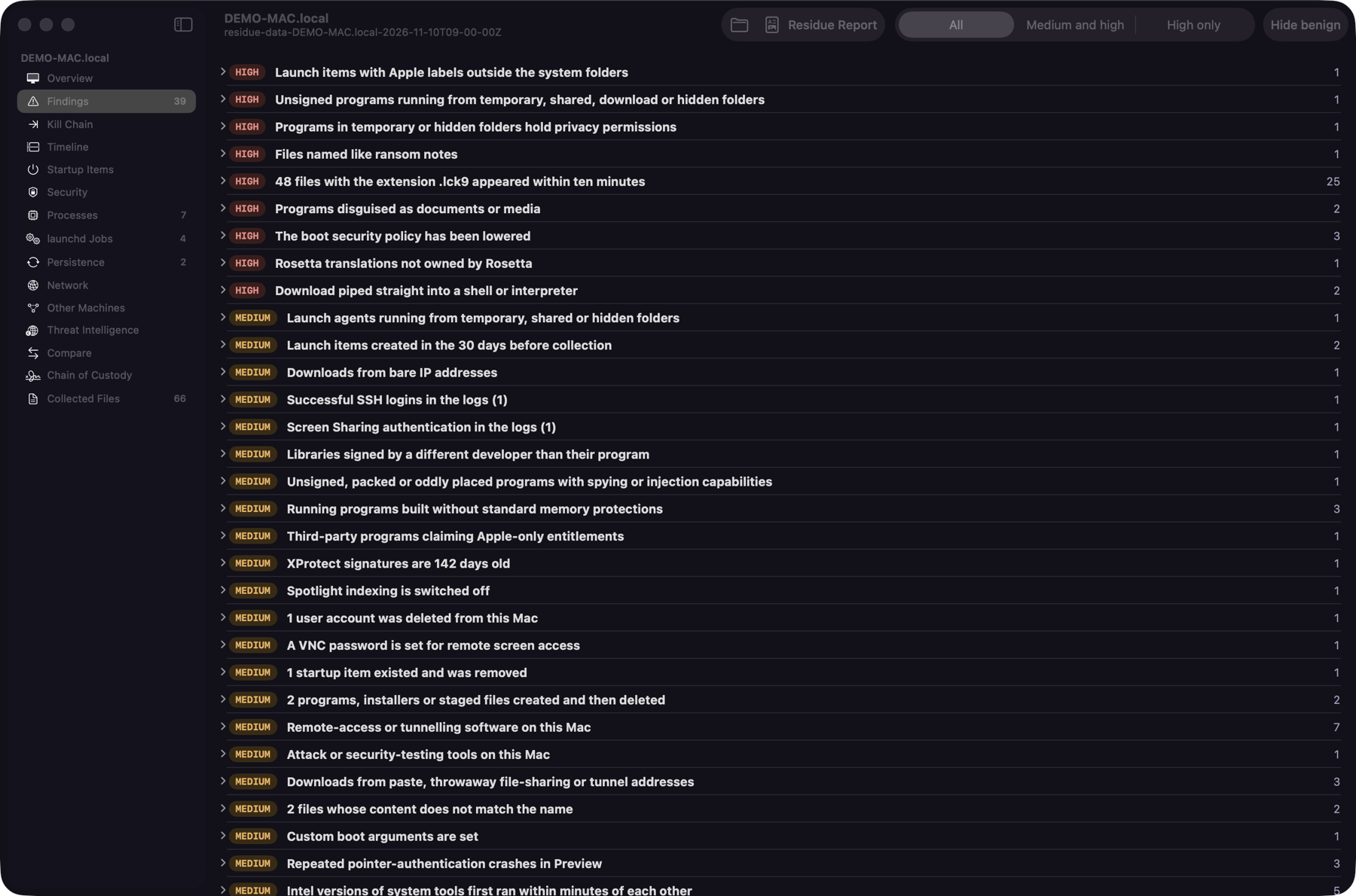
Every screenshot on this page shows an invented case. The Mac, the user, the addresses and the hashes are made up.
Why Residue
When a disk image is not possible
On Intel Macs with a T2 chip and on Apple silicon, the internal disk is encrypted with keys bound to the hardware. A classic disk image is often out of reach, so collecting from the machine while it is running and unlocked is usually the only option. Residue makes that step small and repeatable.
One program, built-in tools only
Residue Gatherer is a single C program that calls the tools macOS already ships. Nothing is installed on the Mac being examined.
Knows the hardware
It recognises Intel, Intel with T2 and Apple silicon, and records the platform's security state for each.
One archive out
Everything lands in one folder and one zip file, with a hash for every file and a chain-of-custody record.
Review anywhere
Residue Viewer runs natively on macOS and on Windows. Both show the same screens, run the same checks and give the same findings.
How it works
Collect, carry, examine
Collect
Run Residue Gatherer on the Mac, from the command line or from its app. You choose the parts to collect; the ones that hold personal data are off until you turn them on.
Carry
The collection is one archive. Copy it to your evidence media and take it to your own workstation. The Mac itself is left as it was.
Examine
Open the archive in Residue Viewer. Every finding links to the exact line of evidence behind it, so nothing has to be taken on trust.
| Part | What it is | Runs on |
|---|---|---|
| Residue Gatherer | The collector: one command-line program written in C | macOS on Intel, Intel with T2 and Apple silicon |
| Residue Gatherer.app | The same collector with a window: choose the parts, watch the progress | macOS |
| Residue Viewer | The examiner's app | macOS 14 or later |
| Residue Viewer for Windows | The same screens and checks | Windows 10 and 11, x64 |
Residue Viewer
What you see when you open a case
Select a screenshot to see it at full size. Every screenshot on this page shows an invented case. The Mac, the user, the addresses and the hashes are made up.
Overview
The Mac, its system, the count of findings by severity, and a check that no collected file has changed.
Findings
183 automatic checks, most serious first, each with an explanation, its ATT&CK technique and the lines of evidence.
Kill Chain
The findings placed along the stages of an intrusion, from delivery to actions on the target.
Timeline
Every dated event of the case in one list: filter by period, kind or text, follow a process and what it started, bookmark what matters.
Startup Items
Every way code starts on this Mac, in one table, with the signer of each program.
Security
System Integrity Protection, FileVault, Gatekeeper and the rest of the platform's protections, as found.
Processes
What was running, as a table or as a tree of parents and children, with what is known about each program.
Other Machines
The machines this Mac connected to, or that connected to it, and how.
Threat Intelligence
Look up program hashes you select. Only the hashes are sent, and only when you ask.
Chain of Custody
Who collected what, when and how, with the hashes of the archive, ready to print.
Findings
Checks that show their work
A finding is a starting point, not a verdict. Each one says what was seen, why it can matter, and where to look.
Three severities
HIGH MEDIUM INFO Legitimate software can match a check, and a case with no findings is not proof that the Mac is clean.
Evidence one click away
Every finding lists the lines it is based on. Opening one shows the collected file at that line.
Mapped to ATT&CK
Findings carry their MITRE ATT&CK technique and the reference the check comes from.
Reports and indicators
Export a single-file HTML report, the indicators as CSV or STIX 2.1, and the chain-of-custody record as PDF.
What it collects
Clear limits on what is taken
A collector on someone's Mac touches private data. Residue separates what is collected by default from what needs a deliberate choice, and from what it never takes.
By default
- System, hardware and platform security state
- Running processes, their programs and signatures
- Startup items: launch agents and daemons, login items, scheduled jobs, extensions
- Network configuration, connections and listening ports
- Accounts, privacy permissions, downloads and their origin
- Logs, crash reports and file-system change records
Only when you turn it on
- User activity: shell history, recent items, app use
- Browser history and open tabs
- A full listing of the disk with dates and hashes
- The unified log archive and a sysdiagnose
- Personal content: notes, notification text, the clipboard
Never collected
- Keychain contents and password hashes
- Cookies, saved logins and autofill data
- The content of the browser cache
- Mail, Messages, Photos, Calendar, Contacts and Wallet stores
- SSH private keys
Plainly
What Residue is not
Not a certified forensic tool
Residue has not been validated or certified by any body. Use it within your own procedures and authority.
Not a verdict
Its findings are heuristics meant to direct an examiner's attention. They do not replace one.
Not finished
Residue is in development. It has not yet been released, and what it does may change.
Download
Coming soon
Builds are not published yet. The buttons below will work when they are.
Residue Gatherer
The collector and its app, as one universal build.
macOS · Intel and Apple silicon
Coming soonResidue Viewer
The examiner's app for the Mac.
macOS 14 or later
Coming soonResidue Viewer for Windows
The examiner's app for Windows. Self-contained: nothing else to install.
Windows 10 and 11 · x64
Coming soon